
A Python text-based adventure game combines a room map, typed commands, collectible items and a repeating game loop in one manageable project. In this Shadow Demon game, the player begins in the Eternal Hall, explores connected rooms, adds six required items to an inventory and enters the Boss Room for the final encounter. The completed program turns a hand-drawn plan into an interactive PyCharm console experience.
Students get a lot from this code because each game action corresponds to a core Python idea. A nested dictionary stores the map, and functions separate movement, item collection and status output. A while loop keeps the session alive. Conditional branches interpret commands and select an outcome. None of these ideas remains abstract once a wrong direction leaves the player in the same room or a collected sword appears in the inventory.
What Does This Python Adventure Game Include?
This Python adventure includes seven defined game rooms, six collectible inventory entries, five command patterns and two possible Boss Room outcomes. The story, map and terminal output give those programming structures a clear purpose.
| Game element | Implementation | Player-facing result |
|---|---|---|
| World map | Nested rooms dictionary | Movement between connected locations |
| Current position | current_room string | The console names the active room |
| Collectibles | Room-level items lists | Items appear in the room and move into inventory |
| Inventory | Shared Python list | Collected equipment can be displayed later |
| Commands | Tokenized text input | The player moves, picks, checks status or exits |
| Game cycle | while True loop | Play continues until the boss encounter or exit |
| Final decision | Inventory comparison | The player defeats the demon or loses the battle |
| Presentation | Multiline ASCII art | The introduction and boss encounter feel distinct |
The game accepts these commands:
move North, move South, move East or move West
pick [item name]
show inventory
show status
exit
That command set is small enough to understand quickly and broad enough to exercise string processing, lists, dictionaries, branching and function calls in the same program.
How Does the Story Define the Programming Problem?
The story defines the game objective before the code defines the data. The player wakes inside a dark dreamscape ruled by the Shadow Demon and searches for the supplies required for the final battle. Locations such as the Slave Quarters, Battleground, Demon’s Forge, Library and Dark Garden become dictionary keys. Food, a sword, a shield, protective equipment, a spell book and a mushroom become collectible values.
The order helps. A text game becomes easier to program when the developer can answer four questions before writing the loop:
Where does the player start?
Which directions connect each room?
Which item belongs to each location?
Which event ends the game?
The storyboard answers those questions visually. The code converts the same relationships into a form Python can inspect during play.
The Eternal Hall acts as the central starting point. From there, the map branches toward the Slave Quarters, Demon’s Forge, Dark Garden and Amethyst Cave path shown in the design. The Boss Room contains the Shadow Demon and represents the terminal encounter. This gives movement a strategic role: entering a normal room continues exploration, while entering the Boss Room ends the gameplay loop and triggers the inventory check.
Students working on a larger task can use How to Tackle a Large Programming Assignment Step by Step to divide the work into the same practical stages: understand the narrative, model the data, implement one command, test the loop and then add the final conditions.
How Is the Room Map Stored in a Nested Dictionary?
The room map is stored as a dictionary whose values are smaller dictionaries containing directions, items and descriptions. Each room therefore carries the information the game needs at the moment the player enters it.
rooms = {
    "Eternal Hall": {
        "North": "Slave Quarters",
        "East": "Demon's Forge",
        "West": "Amethyst Cave",
        "South": "Dark Garden",
        "items": [],
        "description": ""
    },
    "Slave Quarters": {
        "South": "Eternal Hall",
        "East": "Battleground",
        "items": ["Food"],
        "description": ""
    }
}
The outer key names a room, the directional keys mark its legal exits and their values name the destination rooms. The items key stores a list because a room can contain zero, one or several collectibles. The description key reserves a place for room-specific narration.
This arrangement removes a large chain of room-specific if statements. Movement code does not ask whether the player is in each possible room one at a time. It looks up the active room and checks whether the requested direction exists there.
Seven implemented locations organize the dreamscape
The finished program defines these locations and contents:
| Room | Available exits in the solution | Item entries |
|---|---|---|
| Eternal Hall | North, East, West, South | None |
| Slave Quarters | South, East | Food |
| Battleground | West | Obsidian Sword; Quartz Shield |
| Demon’s Forge | West, North | Citrine Armour and Helmet |
| Library | South | Books of spells and Rituals |
| Dark Garden | North, East | Ascendent Mushroom |
| Boss Room | West | None |
The room map holds the game’s world, not just a list of names. move(), describe_room() and pick_item() all read from the same object, so the program does not maintain separate, competing versions of the world.
How Does the Game Read and Validate Commands?
The get_command() function reads a line from the console, splits it into words and returns a structured command after matching the requested action. The gameplay loop receives a list such as [“move”, “South”] or [“pick”, “Ascendent Mushroom”] instead of interpreting the raw sentence itself.
def get_command(room):
    while True:
        command = input("What would you like to do?\n").split()
        words = len(command)

        if command[0] == "move":
            command[1] = command[1].capitalize()
            if words != 2 or not command[1] in [
                "North", "West", "South", "East"
            ]:
                print("Invalid direction. Try: North, West, South or East.\n")
                continue
            return command
Calling .split() gives the parser a simple structure. The first word acts as the verb. The remaining words carry the action’s value. Direction input is capitalized before validation, which lets the room dictionary retain consistently capitalized keys.
Item commands require a little more work because item names contain spaces. The program joins every word after pick:
elif command[0] == "pick":
    item = ' '.join(command[1:])
    if item in rooms[room]['items']:
        return [command[0], item]
Without join(), a command such as pick Obsidian Sword would separate the item into two unrelated tokens. Rebuilding the text preserves the exact room-list value and allows a direct membership check.
Validation keeps the player inside the command system
The parser compares movement verbs, directions, display options and item names against allowed values. An invalid direction produces a directional hint. An invalid item command displays the items available in the current room. An unsupported show request points the player toward inventory or status.
The function contains its own loop, so it can request another command without restarting the game. This creates two levels of repetition:
The command loop repeats until it receives an accepted instruction.
The gameplay loop repeats until the player exits or enters the Boss Room.
That separation keeps command correction local. The main game does not contain a second copy of every validation message.
How Does Movement Work Between Connected Rooms?
To move, the game checks whether the chosen direction is a key inside the current room’s dictionary. A valid key returns the destination. An unavailable direction leaves the location unchanged and prints a message.
def move(current_room, direction):
    if direction in rooms[current_room]:
        current_room = rooms[current_room][direction]
    else:
        print("There is nothing in this direction!")

    return current_room
This function receives the current state rather than reading it from the console. That makes its job precise: translate one valid directional relationship into a new room name.
The main loop stores the returned value:
elif command[0] == "move":
    current_room = move(current_room, command[1])
The assignment matters here. Strings are immutable values, so changing the local current_room inside move() does not automatically update the variable inside main(). Returning the destination and assigning it back makes the state change visible during the next loop iteration.
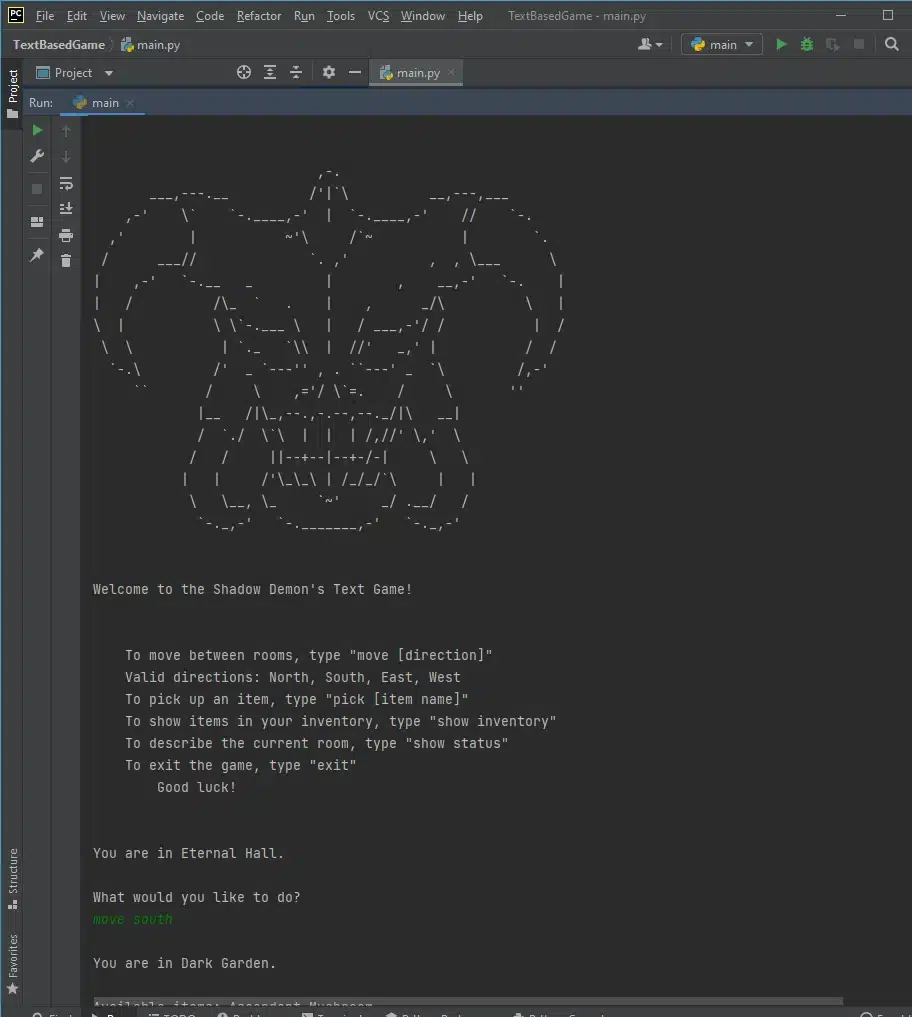
The first screenshot demonstrates this exchange. The game prints its title art and instructions, identifies the starting location as Eternal Hall, accepts move south and then reports Dark Garden as the new room.
How Are Room Items Displayed and Collected?
describe_room() displays room items and pick_item() collects them. Both functions read the items list attached to the active room.
def describe_room(room):
    if room in rooms:
        print(rooms[room]['description'])
        if len(rooms[room]['items']) > 0:
            print('Available items: ', end='')
            print(','.join(rooms[room]['items']))
The length check prevents an empty item label from appearing in rooms without collectibles. The join() call displays multiple items on one readable line. In the Battleground, for example, the list contains both the Obsidian Sword and Quartz Shield.
Collection changes two pieces of state:
def pick_item(room, item):
    if item in rooms[room]['items']:
        rooms[room]['items'].remove(item)
        inventory.append(item)
        print(item, 'has been added to your inventory.')
First, remove() takes the item out of the room. Second, append() adds it to the player’s inventory. Moving the value instead of copying it prevents the same visible object from remaining in both places after collection.
The hand-drawn item flowchart captures this logic in plain terms: enter a room, display its items, select an item, add it or leave it, accept input and save the inventory. The Python functions divide those stages between presentation, validation and mutation.
How Does the Inventory Track Progress?
Progress lives in a Python list that the game functions share. It begins empty and grows each time pick_item() transfers a valid room item.
inventory = []

def print_inventory():
    if len(inventory) > 0:
        print('Your Inventory: ')
        for item in inventory:
            print('>>', item)
    else:
        print('You have 0 items in your inventory.')
The function handles both cases. An empty inventory gets a direct message, and a populated one prints one entry per line, which stays readable as the collection grows.
The six required entries named by the final comparison are:
Obsidian Sword
Quartz Shield
Citrine Armour and Helmet
Books of spells and Rituals
Ascendent Mushroom
Food
Several item names contain multiple words, and two room entries represent grouped equipment. Storing each collectible as one string lets the parser, room dictionary, inventory and final comparison use the same label.
The show inventory command calls print_inventory() at any point during exploration. The player can therefore inspect progress without changing rooms or collecting another object.
What Information Appears in the Player Status?
Player status combines the health value, inventory and current-room information. The program initializes health at 100 and prints it through print_status().
health = 100

def print_status():
    print('Your health : ', health)
    print_inventory()
When the command is show status, the main loop calls both print_status() and describe_room(current_room). The resulting output answers three practical questions: how much health the player has, which items have been collected and which objects remain in the active location.
This is a clean example of function composition. print_status() reuses print_inventory() instead of recreating its loop. The main function then adds room description output without moving that responsibility into the inventory function.
For a broader explanation of why visible state checks matter during coursework, Why Testing Matters in Programming Assignments connects console evidence with systematic input and output testing.
How Is the Main Gameplay Loop Organized?
The main gameplay loop checks the terminal room, prints the current state, requests a command and dispatches the corresponding function. It repeats until the player exits or reaches the boss.
The working order is:
Set current_room to Eternal Hall.
Print the introductory ASCII artwork.
Print the game title and command guide.
Check whether the player has entered the Boss Room.
Display the current room and available items.
Request a validated command.
Move, pick, show information or exit.
Return to the top of the loop.
The dispatcher remains compact because each branch delegates its work:
if command[0] == "exit":
    print("Thank you for playing this game.\n")
    break
elif command[0] == "move":
    current_room = move(current_room, command[1])
elif command[0] == "pick":
    pick_item(current_room, command[1])
elif command[0] == "show":
    if command[1] == "inventory":
        print_inventory()
    elif command[1] == "status":
        print_status()
        describe_room(current_room)
Every iteration handles one player decision. This is the central rhythm of a command-line game: show state, accept input, update state and repeat.
How Does the Boss Room Produce a Win or Loss?
The ending depends on one comparison: the collected inventory against the six-item battle list. Reaching the Boss Room triggers the demon artwork before the program selects the ending.
if current_room == "Boss Room":
    if [
        "Obsidian Sword",
        "Quartz Shield",
        "Citrine Armour and Helmet",
        "Books of spells and Rituals",
        "Ascendent Mushroom",
        "Food"
    ] == inventory:
        print("Congratulations! You have reached the final room!\n")
        print("You fought heorically and defeated the demon with all your might.\n")
    else:
        print("You were not ready and the demon ate you alive.\n")
    break
This branch turns item collection into a game objective rather than an isolated list exercise. The same inventory that appears in show inventory becomes the evidence used at the final encounter.
The second supplied screenshot records the transition from Dark Garden toward the boss. The console displays the Ascendent Mushroom as the available item, accepts move east and then prints the large Shadow Demon figure that marks the endgame.
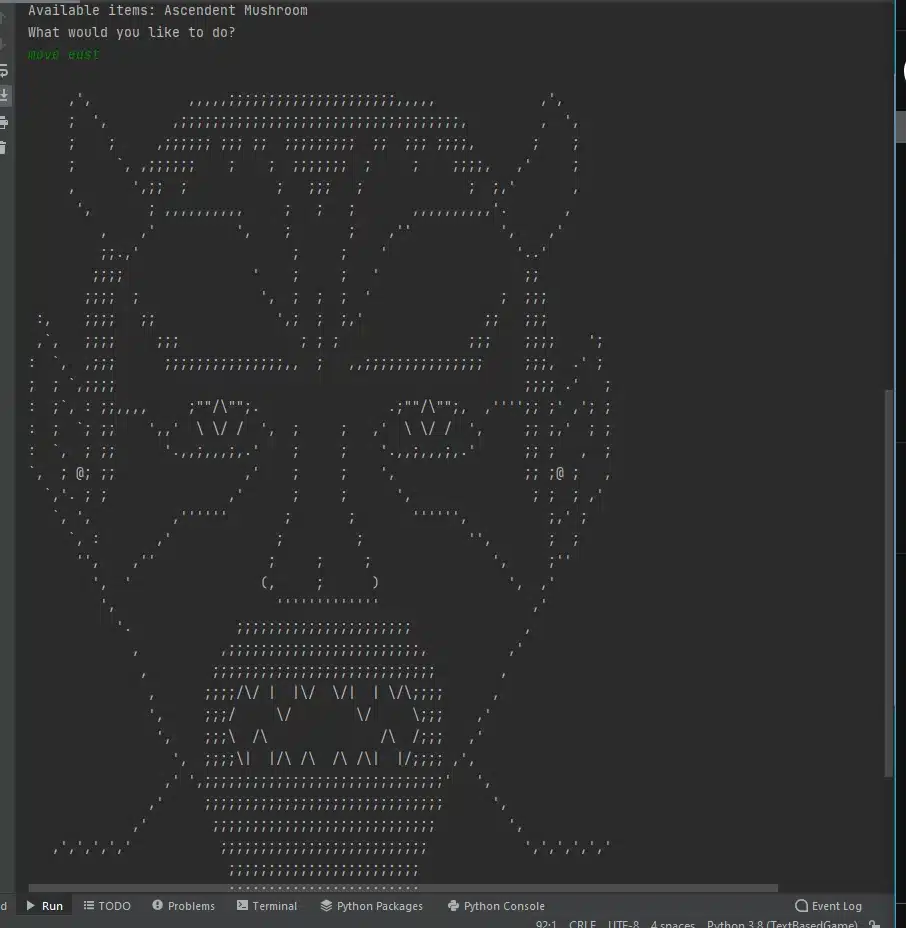
The boss check sits at the top of the loop. A movement command first changes current_room to Boss Room. The next iteration detects that value before requesting another command, prints the encounter and exits with break after either result.
Why Does the Program Use Separate Functions?
Separate functions keep each rule close to the code that enforces it. The final solution divides the game into eight named functions:
get_command(room) reads and validates player input.
move(current_room, direction) calculates the next location.
describe_room(room) displays room text and available objects.
print_instructions() lists the supported commands.
print_inventory() displays collected items.
pick_item(room, item) transfers an item into inventory.
print_status() displays health and inventory.
main() coordinates the complete session.
This structure makes the main loop readable. A reader sees pick_item(current_room, command[1]) and understands the intent immediately. The lower-level list operations stay inside the dedicated function.
Functions also make explanations easier during a demonstration. A student can describe the program one behavior at a time: the dictionary models the world, the parser recognizes commands, the movement function changes position, the item function changes inventory and the loop decides when play ends.
What Does the ASCII Art Add to the Project?
ASCII art gives the console game a visual identity without introducing a graphical interface. The opening figure establishes the dark fantasy theme, while the larger boss figure separates ordinary exploration from the final encounter.
Python prints each artwork as a multiline string. Triple quotes preserve the line breaks and spacing required for the terminal drawing:
print("""
        multi-line ASCII artwork
""")
This is still plain text output. It therefore fits naturally inside the same PyCharm Run console used for prompts, room names and inventory messages.
The screenshots show how much presentation can come from terminal text alone. The artwork, indentation, blank lines and command labels give the program a recognizable atmosphere before the player reaches any complex mechanics.
How Can a Student Test a Text-Based Game?
Testing this game means tracing commands through the room dictionary and recording the resulting room, inventory and ending. One successful screen proves little, while a small scenario set exercises the whole control flow.
Test movement commands
Begin in Eternal Hall and enter a direction listed for that room. Confirm that the next status line names the linked destination. Then enter a direction not listed in the active room and confirm that the game reports no path in that direction.
Test item collection
Enter a room containing an item and use its full displayed name after pick. Confirm that the success message appears, the object disappears from the room and show inventory lists it.
Test information commands
Run show inventory before and after collecting an item. Run show status and confirm that it prints health, inventory and current-room contents without changing location.
Test both boss outcomes
Enter the Boss Room before completing the required collection and record the losing output. Run a second session that gathers the complete six-entry inventory before the encounter and record the victory output.
Test voluntary exit
Enter exit during exploration. Confirm that the farewell messages appear and that the loop stops without entering the boss branch.
This scenario-based method connects each requirement with observable console evidence. It also gives students a clear explanation when an instructor asks how the finished project was tested.
Which Python Concepts Does This Project Demonstrate?
The project demonstrates how several introductory Python concepts cooperate inside one program:
Dictionaries represent rooms and directional relationships.
Nested data structures keep exits, items and descriptions together.
Lists store room contents, commands and player inventory.
Strings represent room names, directions, items and messages.
String methods split commands, join item names and normalize directions.
Functions divide the game into named behaviors.
Parameters and return values pass room state between functions.
Conditional statements select commands and game outcomes.
Loops repeat command validation and gameplay.
Membership tests validate directions and available items.
List mutation removes objects from rooms and appends them to inventory.
Formatted strings insert the current room into console output.
Multiline strings preserve ASCII art.
The result belongs to several categories described in 12 Common Programming Assignments and How to Approach Them: it is simultaneously a data-structure exercise, an input-validation task, a control-flow problem and a small software-design project.
How Can the Same Structure Support a Different Game?
A different game needs new story data but the same command engine. Change the dictionary values, collectible names, opening text and final encounter, and the loop can drive a mystery, survival game, science-fiction mission or historical exploration.
Three layers make that adaptation practical:
World data: room names, exits, items and descriptions.
Game rules: supported commands, collection behavior and final condition.
Presentation: title, instructions, messages and ASCII artwork.
Keeping those layers recognizable prevents a theme change from becoming a complete rewrite. A new map touches the rooms dictionary, a new object touches an item list, and a new ending touches only the Boss Room messages. The relationship between input, state and output stays the same.
Students who want language-specific guidance can use Python homework help to work through the dictionary, functions and game loop with a human expert while following their course’s collaboration rules. Students working in another language can explore MyCodingPal’s broader programming assignment help.
Frequently Asked Questions
What is a Python text-based adventure game?
A Python text-based adventure game is an interactive console program in which typed commands change the player’s location, inventory or game state. This project uses room names and printed ASCII artwork instead of a graphical window.
Why is a dictionary useful for game rooms?
A dictionary links each room name to its exits, items and description. The program can inspect the active room at runtime instead of hard-coding a separate movement branch for every location.
Why are the room values also dictionaries?
Nested dictionaries group several attributes under one room key. Direction keys point toward neighboring rooms, while items and description store information used after entry.
How does the game recognize a multiword item?
The command parser joins every token after pick into one string. A command such as pick Quartz Shield therefore matches the exact value stored in the room’s item list.
How does collecting an item change the game state?
The pick_item() function removes the item from the current room and appends it to the inventory. The object then disappears from the room display and appears in the player’s collection.
What keeps the game running after one command?
The while True loop repeats the state display, command request and action dispatch. An exit command or completed Boss Room encounter reaches a break statement and stops the loop.
How does the program decide whether the player wins?
The program checks the inventory after the player reaches the Boss Room. Matching the required six-item list prints the victory messages; reaching the boss without that collection prints the losing message.
What do the supplied screenshots demonstrate?
The screenshots demonstrate the PyCharm console launch, instruction display, Eternal Hall starting state, movement to Dark Garden, room-item display, movement toward the Boss Room and the Shadow Demon encounter artwork.
From Storyboard to a Playable Python Game
This project turns a short fantasy narrative into a working relationship between data and behavior. The dictionary holds where the player can go, and the command parser works out what the player asked for. Small functions update the room and inventory. The main loop ties those pieces together until the Shadow Demon encounter ends the session.
Students can watch a hand-drawn room map become nested data and a flowchart become function calls, then prove the connection by entering commands in PyCharm. A finished text game shows dictionaries, loops and branching working as one system instead of as separate exercises.